

Independent Android utility studio

Useful software
should feel inevitable.

Keyrox creates focused Android apps that turn small daily frustrations into fast, private and beautifully simple actions.

Local processing where practicalFair one time upgradesClear privacy choices
KEYROX OS
PRIVATE PROCESSINGON DEVICE
Photo Metadata and EXIF Remover app icon
GPSRemovedEXIFCleanUploadNever
10focused utilities
Privacy focused
01Launching first
Scroll to discover
ANDROID UTILITIESLOCAL PROCESSINGNO CLUTTERFAIR MONETIZATIONDESIGNED IN PORTUGAL

The Keyrox collection

Ten focused apps.
Zero filler.

Our roadmap is built around real jobs people already need to complete. Clean a photo. Find an earbud. Calculate a shift. Prepare a document. Every app earns its place.

01Launching first

Photo privacy

Photo Metadata & EXIF Remover

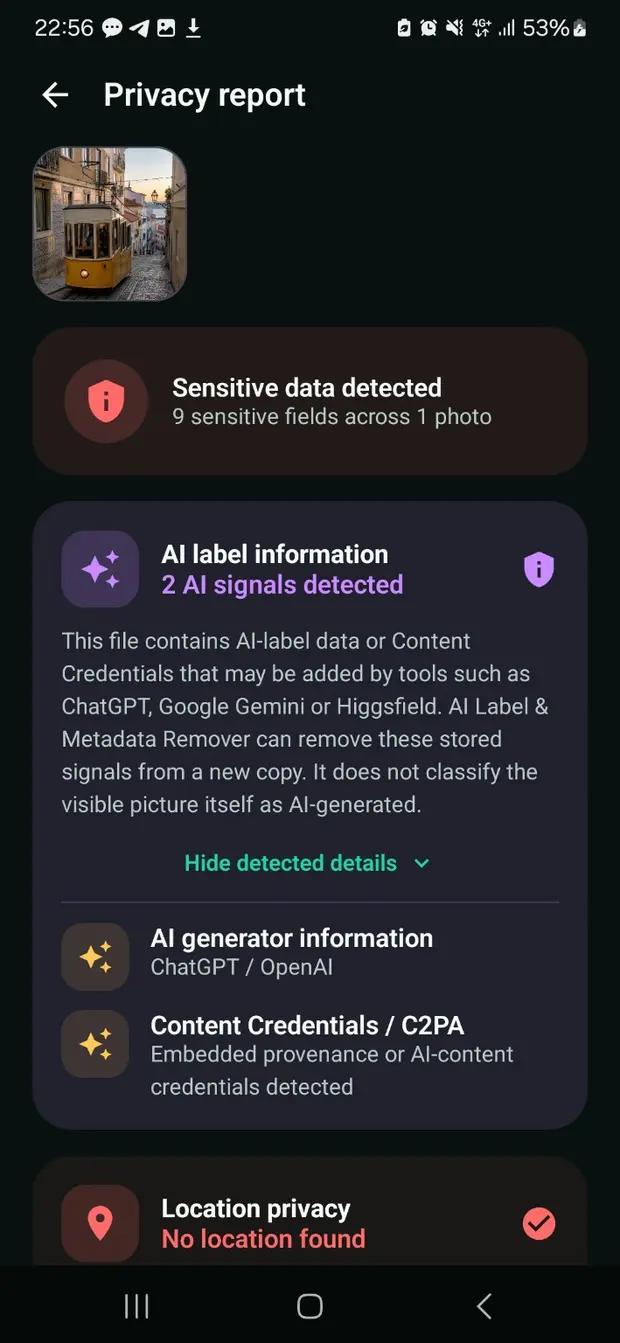
Inspect hidden photo information and create clean copies without GPS, device, timestamp, EXIF or XMP metadata.

EXIF removerPhoto metadataGPS cleaner
Explore the app
02In development

Productivity

Tally Counter

Count anything quickly with multiple counters, clear history and satisfying feedback.

Fast countingMultiple countersHistory
Preview the idea
03In development

Device utility

Bluetooth Finder

Locate nearby earbuds, trackers and accessories through live Bluetooth signal strength.

Find earbudsSignal radarNearby devices
Preview the idea
04Planned

Work utility

Shift Pay Portugal

Estimate shift income, night work, overtime and common salary additions in Portugal.

Shift incomeNight workPortugal
Preview the idea
05Planned

Organization

Expiry Reminder

Remember document, food, medicine, warranty and subscription expiry dates before they become problems.

Smart remindersDocumentsExpiry dates
Preview the idea
06Planned

Travel utility

Average Speed Assistant

Understand the pace needed across timed routes and checkpoints with clear calculations.

Average speedRoute paceCheckpoints
Preview the idea
07Planned

Design utility

Screenshot Studio

Frame, crop, annotate and prepare polished screenshots for sharing and app listings.

Screenshot editorDevice framesAnnotations
Preview the idea
08Planned

Photo utility

Passport Photo Assistant

Prepare correctly sized identity photo layouts with practical guidance for digital use and printing.

ID photosCorrect sizesPrint layouts
Preview the idea
09Planned

File utility

Image & PDF Converter

Convert images and PDF files through a simple workflow built around clarity and local processing.

Image to PDFPDF to imageLocal conversion
Preview the idea
10Planned

Reference utility

Ingredient Scanner

Turn dense ingredient labels into information that is easier to read and understand.

Label scannerIngredientsClear summaries
Preview the idea

First release

Share the photo.
Not the hidden data.

Photo Metadata & EXIF Remover reveals location, camera, time, author, EXIF and XMP information inside an image, then creates a sanitized copy locally on your phone.

Explore the app
Photo Metadata and EXIF Remover app icon
GPSRemoved
Camera modelRemoved
EXIF and XMPClean copy

Our standard

We remove friction.
Not personality.

A useful app should feel obvious after the first tap and dependable after the hundredth. We obsess over the small details that make software feel calm.

01

One clear job

No crowded dashboards. Every screen moves the user toward a useful result.

02

Privacy by restraint

We avoid collecting information simply because a tool makes it possible.

03

Fair value

Free versions remain useful. Premium choices are clear and proportionate.

04

Fast on real phones

Motion adds clarity. It never becomes a reason to wait.

0apps on the roadmap
0clear purpose per app
0accounts required where possible
attention to useful details

How ideas become products

Notice. Simplify. Polish.

We start with an irritation people already understand. Then we remove every step that does not help solve it.

01

Notice the friction

Find a task that feels slower, less clear or less private than it should.

02

Reduce the path

Turn the task into a short sequence with obvious choices and useful feedback.

03

Polish the feeling

Refine motion, language, accessibility and performance until the app feels natural.

Build with us

The next useful app may start with your problem.

Tell us about a repetitive task, a confusing tool or a small frustration that deserves a better solution.

Share an idea